Autocomplete. Everywhere.
Opsis already knows your work. Start typing in any app and it finishes your sentence with the right date, number or link from your screen, mail and docs. Tab keeps it. Tab twice and it writes the whole reply.

Free to start. For Mac and Windows.
As seen in


Works in the apps you already use.
Desktop apps and the browser, on Mac and Windows.

It already knows what you're working on.
Most AI tools make you explain everything first. Opsis saw the work happen, so it can fill in the details for you.
Completes
It finishes the sentence.
Pause mid-sentence in any app and the rest shows up at your cursor, written from the files and threads you've seen. Press Tab to keep it.
Notices
It spots the wrong detail.
Type a date or number that doesn't match what you read, and Opsis shows you the right one and where it came from.
Remembers
It remembers your work.
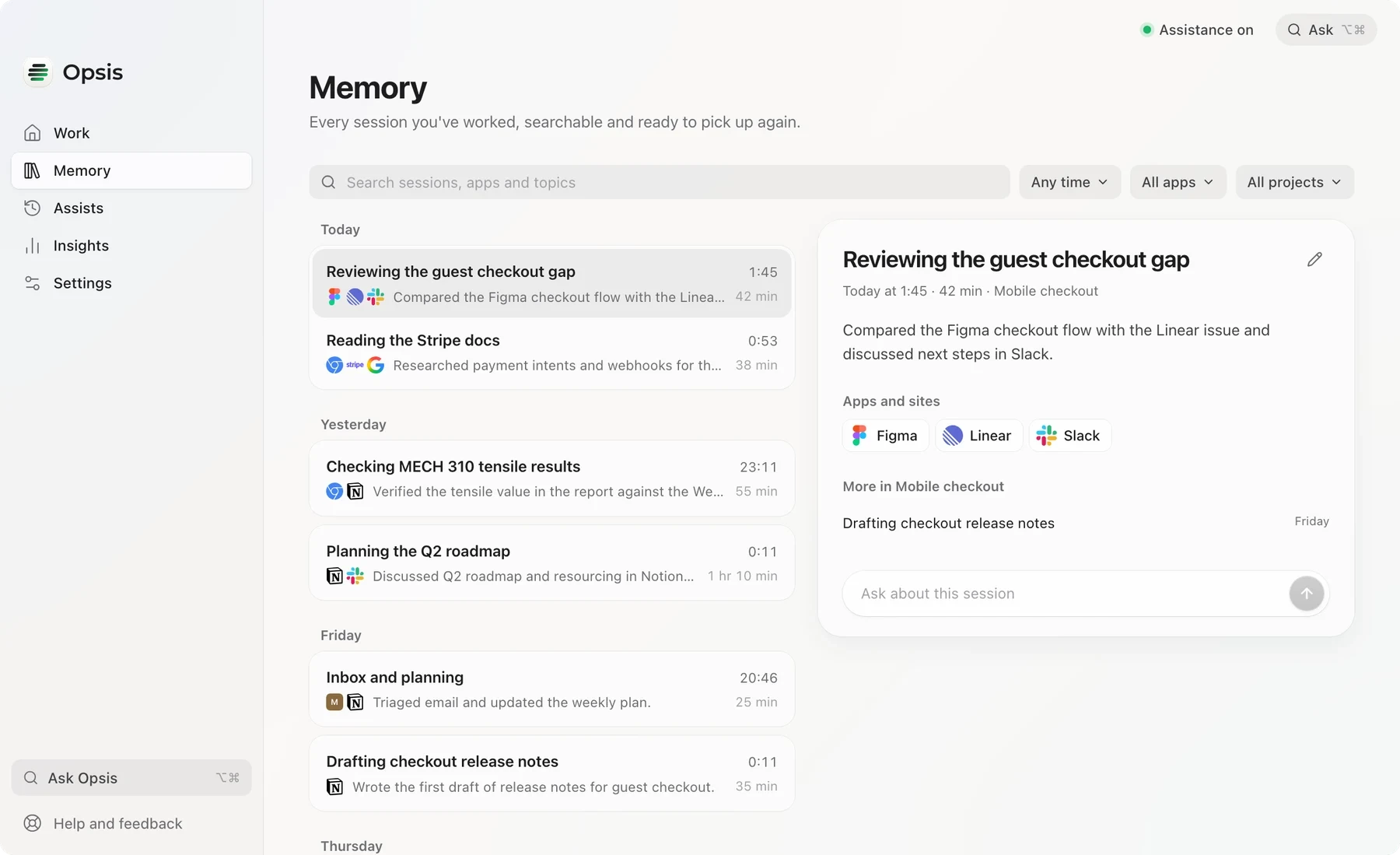
Each work session gets a plain name and a short summary. That memory is what Opsis writes from.
Start typing. Opsis writes the rest.
Pause mid-sentence and the rest appears in grey, written from your screen, files and mail. Tab keeps it. In an empty reply, Tab twice writes the whole thing.

Hey Lena, finance says they never got the October invoice?? Can you resend. And what was the total again, I need it for budget tmrw
Tom Becker · Becker & Co Joinery
On 17 Nov 2026, at 8:12 am, Tom Becker wrote:Hey Lena, finance says they never got the October invoice?? Can you resend. And what was the total again, I need it for budget tmrw
Pulls from more than one place.
One sentence can need a date from your calendar and a detail from an email. Opsis reads both, writes one line, and names each app it used.
Take as much as you want.
Each Tab keeps the next phrase. Shift+Tab keeps one word. Esc hides it.
Sounds like you.
Drafts follow the way you write in each place, casual with your cofounder and careful in the email to an investor.
Wherever you type.
Chats, email, docs and the browser, on Mac and Windows. It stays out of code editors and terminals, where Tab is yours.
Easy to ignore.
Keep typing and the suggestion disappears. It waits for your next pause before trying again.
How it works.
Opsis runs in the background. You only see it when you pause mid-sentence or type something that doesn't match.
Typing as usual
Type like you normally do.
Pick the apps Opsis can read. It keeps track of your work in the background, and most of the time you won't notice it.
Pause, and it writes the rest.
Stop mid-sentence and the rest appears at your cursor, written from the Slack thread, the plan and the ticket. It names each app it used.
Press Tab to keep it.
Each Tab adds the next phrase. Shift+Tab adds one word, and Esc hides it. Keep typing and it gets out of the way.
It flags a wrong detail.
If you type something that doesn't match what you read or agreed, a small cue appears next to your words. No pop-ups. Ignore it if you like.
Check the source.
Click the cue or tap the summon keys. A card shows what to change and where that came from.
Fix it in one click.
Click to insert the fix. Opsis never changes your text on its own, and Undo is always there.
See it in your job.
Pick a role and watch Opsis fix the detail you would have gotten wrong.
Q2 launch plan
Goal: guest checkout live in every region. Apple Pay follows in 1.1.
Owners: Priya (mobile), Daniel (payments), Jordan (support playbook).
Updating the launch planThe team moved the launch date in Slack yesterday, but the Notion plan still has the old one. Opsis catches it as you type.
Ask about what's on your screen.
Hold two keys and ask a question. Opsis already knows the project, so you don't have to explain it.
Knows what you're looking at. The app in front of you is included, and you can turn that off for any question.
Answers you can check. Each answer links to the doc, thread or session it came from.
Gone when you're done.Press Esc and you're back where you were.
Your work, by session.
The Opsis app lists your work sessions, each with a plain name and a one-line summary. There are no timers and nothing to tag, so finding Tuesday's work takes one search.
Swipe to explore the screen
We built Opsis because we kept switching apps to find something we had read five minutes earlier: a date in the calendar, a number in an email, a link someone sent in Slack. Now it shows up while we type, and we press Tab.
Shreeneel and Siddak, founders
How it behaves.
A wrong suggestion wastes your time, so Opsis stays quiet unless it's confident.
It shows its source.
Each suggestion names where it came from. Click Why this to see the exact line it used.
Check this value
The Week 4 lab brief lists 38 MPa, not 42 MPa.
“Table 2. Yield stress, specimen A: 38 MPa.”
Quiet by default.
Suggestions show up only when you pause. No notifications, badges or streaks.
Nothing goes in without you.
A suggestion goes in when you press Tab, and a fix when you click. Undo is one press away.
Works in the apps you use.
Desktop apps and the browser, on Mac and Windows. No plugins to install.
Pause it any time.
Click the handle on the edge of your screen to pause Opsis for a private call, a password or the rest of the day.
It remembers last week.
What you read last week still counts today. That's how Opsis knows the date you're about to type.
You control what it sees.
You choose which apps Opsis can read. Everything is encrypted, and you can pause it or delete your history whenever you want.
Assistance
Shared apps and sites
Your data
Only the apps you pick.
Opsis reads the window in front of you, and only in apps you've turned on. Each connected account asks first.
Private windows are skipped.
Opsis never reads private browser windows or password managers.
Encrypted in transit and at rest.
Your data is encrypted on the way to us and while stored. The AI providers we use are set to keep none of it.
No training unless you opt in.
We don't use your data to improve Opsis unless you turn that on, and it starts off. Delete your history any time.
Connect your tools.
Opsis starts with what's on your screen. Connect Drive, Slack, Notion, GitHub or Microsoft 365 and it can use those too. Connections are read only, and you can remove any of them in one click.
How Opsis compares.
With ChatGPT you explain everything first. Screen recorders help you search the past. Opsis works inside the app you're typing in and finishes your sentence from work it has already seen.
| OpsisAutocomplete and assist, from your work | Superhuman GoAI assistant and agents | Chat assistantsChatGPT, Copilot, Claude | Screen recordersMicrosoft Recall, Rewind | Time trackersRescueTime and similar | |
|---|---|---|---|---|---|
| Keeps a searchable history of your own work | Yes, named sessions across every app you share | No. It works from the current screen and connected apps | Past chats and saved memories | Yes, as screen snapshots | App and time logs |
| Knows your work without you explaining it | Yes, from the apps you share | What's on screen now, plus connected apps on paid plans | Only what you paste, connect or told it before | Yes, as a searchable screen history | Only which apps you used, and for how long |
| Finishes your sentences in any app | Yes, press Tab to take a draft written from your files, mail and chats | Inline writing suggestions | Only inside their own apps | No | No |
| Helps while you work | Yes, a small cue beside your words, grounded in your history | Yes, inline suggestions (limited on Free) | When you open it and ask | No, you search after the fact | No, reports after the fact |
| Drafts the next step in the app you're in | Yes, insert with one click, Undo any time | Yes, inline and through agents | Mostly copy and paste from a chat | No | No |
| Shows the source behind every answer | Always, down to the line | Varies by feature | Sometimes | Yes, the saved snapshot | Not applicable |
| Connects your other apps | Google Drive and Docs, Slack, Notion, GitHub and Microsoft 365 | Gmail, Slack and more from Pro. Jira, Linear and more on Business. Not on Free | Varies by plan | No | Some integrations |
| Mac and Windows | Both | Both, plus browser and mobile | Both | Recall needs a Copilot+ PC. Rewind shut down in 2025 | Usually both |
| Where your data is processed | In the cloud, encrypted in transit and at rest, with strict user data controls | In the cloud | In the cloud | Recall: on your device | Varies |
Common questions
What is Opsis?
Opsis is autocomplete for every app on Mac and Windows, and it already knows your work. Start typing and it finishes your sentence from your screen, mail, docs and chats. Press Tab to keep it. If you type a detail that doesn't match what you read, it shows you the right one. Each suggestion shows where it came from.
How does Opsis autocomplete work?
Start typing in an app you've turned on, then pause. The rest of the message appears in grey at your cursor, written from the conversation on screen, your connected files, mail and calendar, and how you usually write. Tab keeps it a phrase at a time, Shift+Tab keeps one word, and Esc hides it. If nothing shows, tap the summon keys and Opsis writes one.
Where does autocomplete work?
In the apps you type in every day: Messages, WhatsApp, Slack, Teams, Gmail, Outlook, Notion, Google Docs, Word and the browser, on Mac and Windows. It stays out of code editors and terminals, where Tab already does something, and out of private windows and password managers.
Does autocomplete keep what I type?
No. Opsis reads what you type to suggest the next words, and doesn't keep a log of your typing. It only works in apps you've turned on, everything is encrypted in transit and at rest, and the AI providers we use are set to keep none of it. We only use your data to improve Opsis if you opt in, and that's off by default.
How is Opsis different from ChatGPT or Copilot?
With ChatGPT you start from a blank page, explain the background, then copy the answer back. Opsis works inside the app you're typing in. It has already seen the brief and the thread, so it can finish your sentence and show you where each detail came from. You can still ask it questions over any app.
How is Opsis different from Superhuman Go?
Superhuman Go, from the company formerly called Grammarly, is an assistant you hand tasks to. It works from what's on your screen right now, and its app connectors start on paid plans. Opsis keeps a history of your work across the apps you share, and uses it to finish your sentences and flag details that don't match, with the source. Opsis is free to start on Mac and Windows.
Is Opsis a Rewind alternative?
Yes. Rewind's Mac app stopped capturing on 19 December 2025, after Meta acquired Limitless, the company behind it. Rewind recorded your screen so you could search it later. Opsis keeps named work sessions from the apps you share and uses them while you type, with a source for each suggestion. It runs on Mac and Windows.
How does Opsis compare with Microsoft Recall?
Recall is a Windows feature for Copilot+ PCs. It saves snapshots of your screen on your device so you can search them later. Opsis runs on any recent Mac or Windows PC, reads only the apps you share, and helps while you type. When assistance is on, Opsis processes shared content in the cloud, encrypted in transit and at rest. If everything must stay on your device, Recall is the closer fit.
Does Opsis record my screen?
No. Opsis doesn't record your screen or give you a replay of your day. It reads the text in the window in front of you, only in apps you've turned on, and skips private windows and password managers.
Is my data safe?
Yes, and you control it. Opsis reads only the apps you share and only the window in front of you, and never reads private windows or password managers. Everything is encrypted in transit and at rest, and the AI providers we use are set to keep none of it. You can pause, disconnect a source or delete your history whenever you like.
Does my work leave my computer?
Yes, when assistance is on. Text from the apps you share goes to our servers so Opsis can write suggestions, encrypted in transit and at rest. You choose which apps are shared, and you can pause or delete your history any time. If you need everything to stay on your computer, Opsis doesn't do that yet.
Will it keep interrupting me?
No. Suggestions appear only after you pause and disappear when you keep typing. A cue shows up only when a detail looks wrong. There are no notifications or badges.
How do I use it?
Just type. When a suggestion appears, press Tab to keep it. On Mac, tap Option and Command for help with what you're doing, hold them to ask Opsis a question, or double tap for quick controls. On Windows, use Ctrl and the Windows key. The handle on the edge of your screen pauses Opsis.
Will Opsis change my documents?
Not on its own. A suggestion goes in only when you press Tab, and a fix only when you click, with Undo always there. If it can't type into an app, it copies the text for you instead.
Which apps and sources does it work with?
Opsis works in desktop apps and the browser on Apple silicon Macs and 64-bit Windows. It starts with what's on your screen and your own work history. You can also connect Google Drive and Docs, Slack, Notion, GitHub and Microsoft 365.
Who is Opsis for?
People who write a lot across many apps: founders answering investors and customers, operators keeping a team in sync, sales and support replying all day. If you keep switching apps to look something up before you reply, it's for you.
Is Opsis free?
Yes, Opsis is free to start. Download it for Mac or Windows at opsis.app/download, open it, and create your account in the app.
Who makes Opsis?
Opsis is built in Melbourne by Shreeneel Tarale and Siddak Bath. We started it because we kept switching apps to find things we had read a few minutes earlier.
Start typing. Press Tab.
Download Opsis, start typing in any app, and press Tab when the suggestion is right.
Free to start. For Mac and Windows.